
At-Risk Customer Delivery Watchlist
for IFS Cloud & IFS Applications 10Real-time visibility into customer order lines at risk of missing their delivery dates—empowering CSRs and logistics planners to act before it's too late.
One-time payment — Single Entity License
Key Features
- Dynamic rolling time window (past + future days)
- 11 comprehensive filter parameters
- Resolved Salesman & Coordinator names
- Update-safe — no core modifications required
1. Document Information
1.1 Modification Specification
| Name | At-Risk Customer Delivery Watchlist |
|---|---|
| ID | REP-INV-002 |
| Component | Supply Chain Management (SCM) |
| Type | Quick Report (SQL) |
| Complexity | Low |
| Compatibility | IFS Cloud (21R1 – 25R2), IFS Applications 10 |
| Version | 1.1 |
| Updated | 2024-05-20 |
| Vendor | IFS-ERP.com |
1.2 Document History
| Version | Date | Author | Description of Change |
|---|---|---|---|
| 1.1 | 2024-05-20 | IFS-ERP.com | Expanded filters (Salesman, Price Groups, Stat Groups) and added descriptive output columns. |
2. Open Issues / Required Decisions
Note for Implementation
Null Handling: The report currently defaults NULL Salesman and NULL Coordinator names to 'No Salesman' and 'No Coordinator' respectively to ensure they appear in the grid results. Administrators may customize these default values in the SQL source prior to deployment.
3. Introduction
3.1 Purpose
The primary purpose of this report is to provide Customer Service Representatives (CSRs) and Logistics Planners with a "Safety Net" visibility tool. It identifies Customer Order lines that are due for delivery immediately (Today/Tomorrow) but have not yet progressed to a "Picked" or "Delivered" state.
3.2 Alternative Solution
Currently, users must manually navigate to the Overview – Customer Order Lines window, query by date range, and filter out shipped lines. This manual process is reactive and prone to human error, often resulting in missed deliveries.
3.3 Scope
The report covers all Outbound Customer Orders across defined Sites (Contracts). It includes logic to look forward (Planning) and backward (Catching missed deliveries), providing comprehensive coverage of the delivery pipeline.
3.4 Limitations
The report currently excludes orders that are "Blocked" at the header level, as these are administrative holds rather than logistical failures. Live data only — not a historical "As Of" snapshot.
3.5 Attachments
SQL Source Code: The full SQL query logic is available in the download package along with a PDF deployment guide.
4. Functional Description
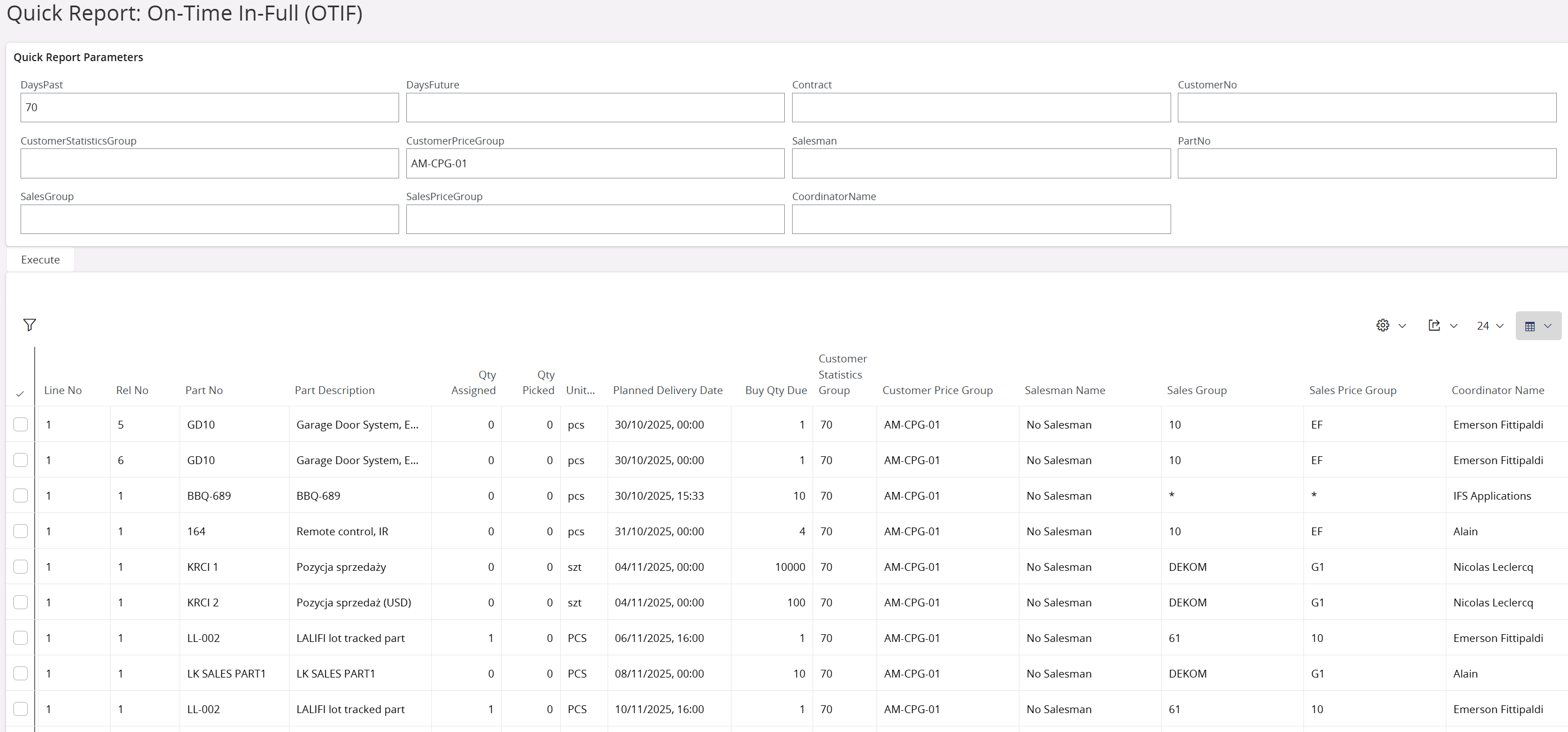
Interactive filter panel — 11 parameters for precise data segmentation
- Dynamic Time Window: Uses variables
&DaysPastand&DaysFutureto create a rolling window of interest. - Comprehensive Filtering: Supports filtering by Salesman, Coordinator, Customer Group, Price Group, and Sales Group for detailed analysis.
- Name Resolution: Displays readable names for Salesmen and Coordinators instead of just ID codes.
- Safety Net Logic: Captures both upcoming orders (proactive) and overdue orders (reactive) in a single view.
Selection Parameters (Filters)
| Parameter | Description | Default Value |
|---|---|---|
&DaysPast |
Number of days to look back for missed orders | 7 |
&DaysFuture |
Number of days to look ahead for upcoming orders | 1 |
&Contract |
Site / Contract filter | % (All) |
&CustomerNo |
Customer ID filter | % (All) |
&CustomerStatisticsGroup |
Filter by Customer Statistics Group | % (All) |
&CustomerPriceGroup |
Filter by Customer Price Group ID | % (All) |
&Salesman |
Filter by Salesman Name | % (All) |
&PartNo |
Filter by Part Number | % (All) |
&SalesGroup |
Filter by Sales Group (Product Group) | % (All) |
&SalesPriceGroup |
Filter by Sales Price Group | % (All) |
&CoordinatorName |
Filter by Order Coordinator Name | % (All) |
Report Output Columns
| Column Name | SQL Alias | Description |
|---|---|---|
| Order No | col.order_no |
Unique identifier for the Customer Order |
| Line No | col.line_no |
Line number of the order |
| Rel No | col.rel_no |
Release number of the order |
| Customer No | col.customer_no |
The customer ID |
| Customer Name | customer_name |
The full name of the customer |
| Cust Stat Grp | Customer_Statistics_Group |
Customer Statistics Group ID |
| Cust Price Grp | Customer_Price_Group |
Customer Price Group ID |
| Salesman | Salesman_Name |
Name of the Salesman (defaults to 'No Salesman' if null) |
| Part No | part_no |
The Inventory Part number |
| Part Description | Part_Description |
Description of the part catalog |
| Sales Grp | Sales_Group |
Catalog Group / Sales Group |
| Sales Price Grp | Sales_Price_Group |
Sales Price Group associated with the part |
| Qty Due | col.buy_qty_due |
Quantity required to be shipped |
| UoM | UnitMeas |
Sales Unit of Measure |
| Qty Reserved | col.qty_assigned |
Current quantity reserved/assigned |
| Qty Picked | col.qty_picked |
Current quantity picked |
| Planned Del Date | col.planned_delivery_date |
Calculated delivery date |
| Status | col.state |
Current line status (e.g., Released, Reserved) |
| Coordinator | Coordinator_Name |
Name of the Order Coordinator (defaults to 'No Coordinator' if null) |
| Site | col.contract |
Site / Contract ID |
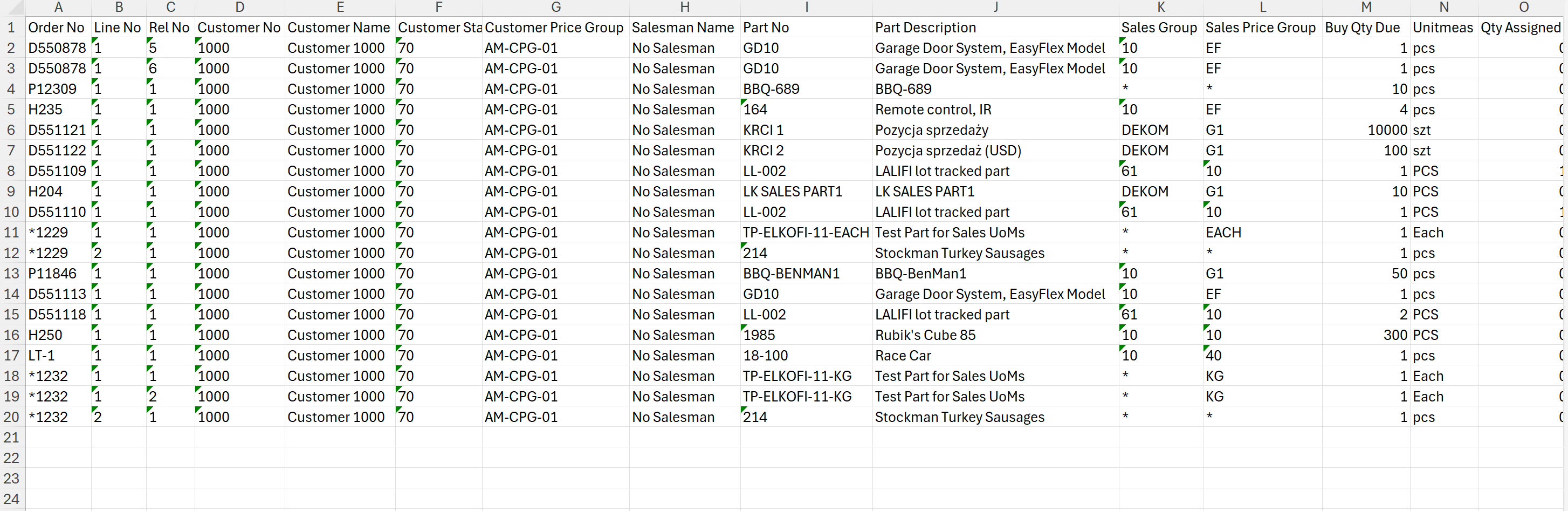
Exported data in Excel — ready for pivot tables or further analysis
5. Technical & Security Description
This report is implemented as a SQL Query designed for the IFS Cloud "Quick Reports" functionality. It is optimized for performance by utilizing indexed columns on the CUSTOMER_ORDER_LINE table.
Prerequisites: IFS Cloud 21R1+ or IFS Applications 10, FND_QUICK_REPORTS permission.
Technology: Standard IFS Quick Report framework (SQL-based, XML Export/Import).
5.1 Database Object Usage
The report aggregates data from the following logical units (Views):
- CUSTOMER_ORDER_LINE (col): Primary driver for line status and dates.
- CUSTOMER_INFO (c): Retrieves Customer Name.
- CUSTOMER_ORDER (co): Header details for Coordinator and Salesman linkage.
- PERSON_INFO (person): Resolves Person IDs to Full Names.
- SALES_PART (s): Retrieves Sales Groups and Price Groups.
5.2 Technical Logic
- Joins: Uses
LEFT JOINforORDER_COORDINATORandPERSON_INFOto ensure orders without assigned coordinators/salesmen are still displayed. - Functions: Utilizes
NVLfor parameter handling, ensuring wildcard (%) defaults. - Date Logic: Uses
SYSDATElogic (BETWEEN SYSDATE - X AND SYSDATE + Y) for relative dynamic ranges.
Security Compliance
- No PL/SQL Package Modifications: Fully compatible with IFS Cloud Evergreen updates.
- Standard IFS Security: Follows standard
FND_QUICK_REPORTSPresentation Object security model. - Permissions: Strictly respects the user's inherent Role-Based Access Control (RBAC) and Permission Sets.
6. Delivery Terms
One-time payment
Source code & guide
Email support included
Test & Prod use
Secure download link
7. Frequently Asked Questions
How do I deploy this report in IFS Cloud?
Can I customize the columns?
Delivery_Terms or Weight) by modifying the SELECT statement before publishing. The full source code is included.Does this work on IFS Applications 10?
CUSTOMER_ORDER_LINE) are standard across IFS versions. While this product is tagged for IFS Cloud, the SQL logic is typically backward compatible with Apps 10 and Apps 9.