


Stock Aging Report for IFS Cloud
Identify slow-moving inventory, reduce carrying costs, and optimize working capital.
Product ID: REP-INV-001 | Category: Supply Chain Finance
1. Document Information
1.1 Modification Specification
| Attribute | Detail |
|---|---|
| Extension Name | Stock Aging Report |
| ID | REP-INV-001 |
| Type | Quick Report (SQL) |
| Component | INVENT (Inventory) |
| Compatibility | IFS Cloud (21R1 - 25R2), IFS Applications 10 |
1.2 Document History
| Version | Date | Author | Description |
|---|---|---|---|
| 1.0 | 2026-01-04 | IFS-ERP.com | Initial Marketplace Release |
2. Open Issues / Required Decisions
Note for Implementation
While this report works out-of-the-box, the following decisions should be made by the user at runtime:
- Aging Buckets Definition: The user must determine the preferred day ranges for the aging buckets (e.g., Standard: 0-30, 31-60, 61-90, >90 days) to match internal financial reporting standards.
- Currency Basis: The report uses the company Base Currency by default to ensure consistency with the General Ledger.
3. Introduction
3.1 Purpose
The primary objective of the Stock Aging Report is to provide financial controllers and logistics managers with a dynamic, real-time analysis of inventory health. By categorizing stock based on its age (derived from the Receipt Date), this tool enables the organization to:
- Identify "Dead Stock" (slow-moving or obsolete items).
- Calculate the exact capital tied up in aging inventory.
- Optimize working capital by focusing on long-standing stock reduction.
3.2 Alternative Solution
Without this report, users typically rely on standard screens like Inventory Part In Stock. These screens provide a static snapshot of quantities but lack time-segmented financial analysis. Users are forced to export raw data to Excel and manually calculate "Days in Stock" for thousands of lines—a process that is time-consuming and prone to human error.
3.3 Scope
The solution includes the delivery and functional installation of a SQL-based Quick Report that:
- Retrieves live data from the
INVENTORY_PART_IN_STOCK_UIVview. - Dynamically calculates the age of every inventory batch relative to the current run date.
- Groups data into user-defined time buckets.
- Displays both Quantity and Financial Value for each bucket.
3.4 Limitations
- Live Data Only: This report reflects the current status of the inventory. It is not a historical "As Of" report.
- Performance: On sites with extremely high volumes (millions of inventory records per site), the report may take a few seconds to render.
3.5 Attachments
Stock_Aging_Report_Source.xml(The Quick Report import file).Installation_Guide.pdf(Step-by-step instructions).
The Business Challenge: The "Dead Stock" Dilemma
Standard inventory reports in IFS Cloud tell you what you have. They don't usually tell you how long it has been sitting there burning cash. This report is specifically designed to solve three critical financial problems:
1. Trapped Capital
Inventory is an asset on the balance sheet but a liability in the warehouse if it doesn't turn. This report exposes exactly how much liquid cash is locked in stock older than 90 or 180 days.
2. Hidden Obsolescence
Standard screens sort by Part Number, not by Age. Old stock gets buried at the bottom of the list. This report brings the oldest items to the top, highlighting expiration risks before they happen.
3. Valuation Blind Spots
If you use Weighted Average Cost, old "dead stock" can skew your margins. This report allows Finance to audit whether inventory provisions (write-offs) are accurate.
4. Functional Description
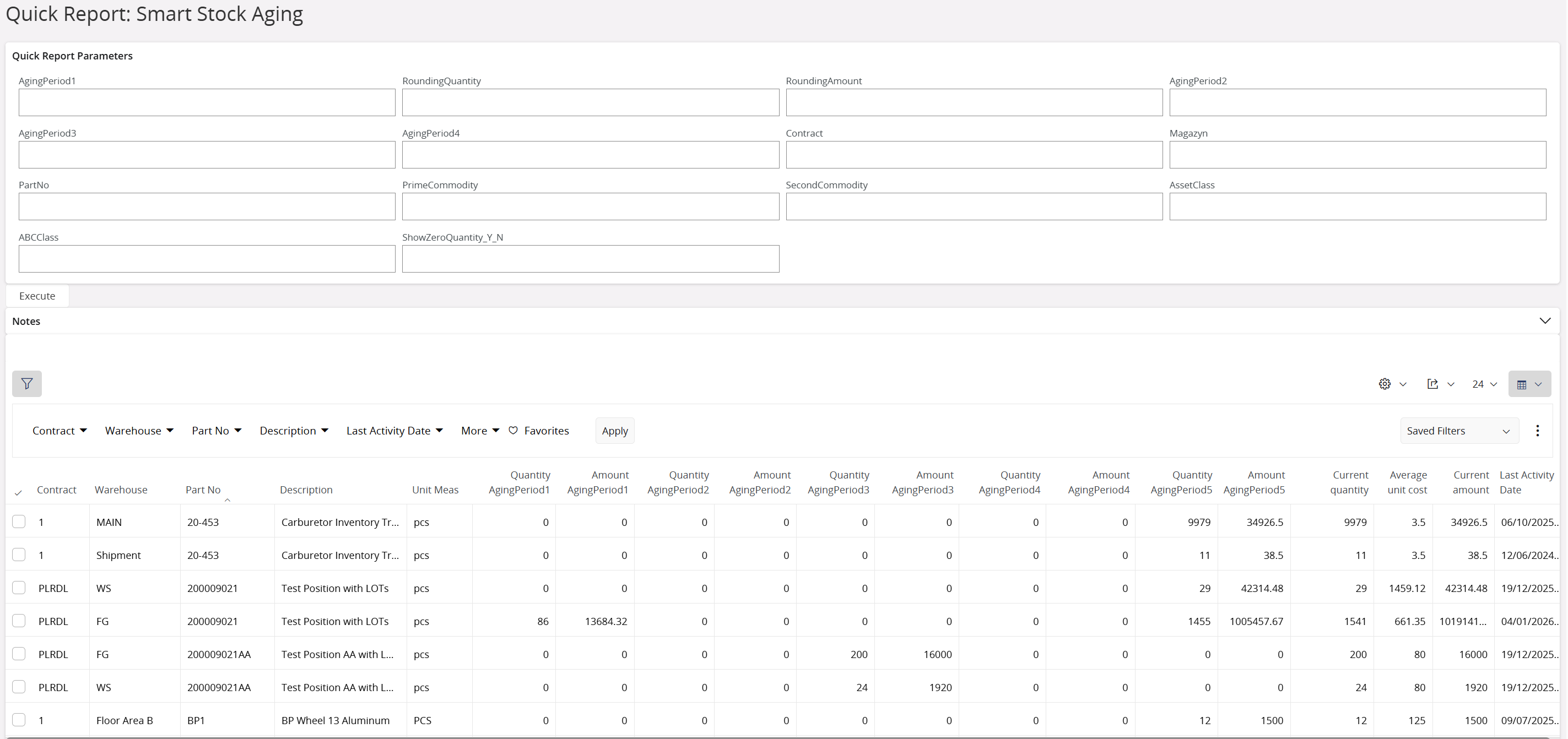
The report is designed as an interactive grid for Inventory Controllers.
Key Features
- Dynamic Aging Logic: Age is calculated as
Current Date - Receipt Date. - Financial Precision: Shows "how much money" is trapped, not just "how many items."
- Filtering Parameters:
- Site: Segregate data by logical unit.
- Warehouse: Pinpoint specific physical locations holding stock.
- Asset Class: Analyze by financial grouping.
- Show Zero Quantity: Toggle to exclude phantom stock.
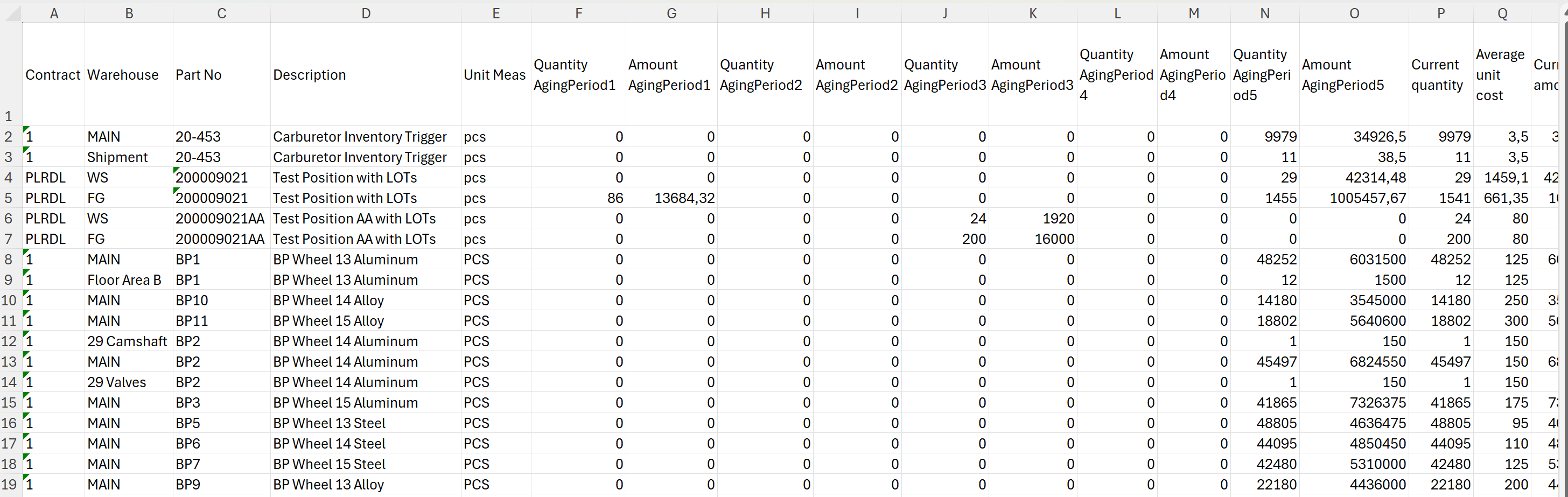
Report Output Columns
- Part No & Description
- Warehouse / Location
- Receipt Date
- Total Age (Days)
- Bucket 1 (0-30 Days): Qty & Value
- Bucket 2 (31-60 Days): Qty & Value
- Bucket 3 (61-90 Days): Qty & Value
- Bucket 4 (>90 Days): Qty & Value
- Total Inventory Value
5. Technical Description
This solution leverages the standard IFS Quick Report framework to ensure stability and upgrade safety.
- Architecture: SQL Quick Report (XML Export/Import).
- Data Source:
INVENTORY_PART_IN_STOCK_UIV. - Logic: Utilizes optimized
CASEstatements to segment inventory into time buckets and aggregates values(quantity * cost)to ensure financial accuracy. - Security: Follows standard IFS Presentation Object security (
FND_QUICK_REPORTS). - Upgrade Safety: No PL/SQL package modifications required. Compatible with IFS Cloud.
6. Delivery Terms
| Licensing | Single Site License (One-time payment). |
|---|---|
| Price | €400 |
| Deliverables | Full SQL Source Code, XML Import File, Installation Guide. |
| Support | 30 Days Email Support (Installation & Bug Fixes). |
| Delivery Time | Secure download link delivered within 24 hours. |
7. Frequently Asked Questions
Can I customise the aging days (e.g., change 30 days to 45 days)?
Yes. The report is built with flexible parameters. You can define your specific aging buckets at runtime or we can adjust the default SQL logic for your specific business requirements before delivery.
Does this report require a system restart or downtime to install?
No. The Stock Aging Report is installed via the "Quick Report" interface in IFS Cloud. It is a configuration change, not a code deployment, so it can be installed instantly in a live environment without downtime.
Is this compatible with IFS Applications 9 or earlier?
The standard package is optimized for IFS Cloud (21R1+). However, the SQL logic is backwards compatible. If you are on IFS Apps 9, please contact us prior to purchase, and we can provide a compatible version.
